CSS3 动画属性 animation-timing-function: steps
一、CSS3 动画 @keyframes 规则
@keyframes规则用于创建动画。在@keyframes中规定某项 CSS 样式,就能创建由当前样式逐渐改为新样式的动画效果。可以改变任意多的样式任意多的次数。用百分比来规定变化发生的时间,或用关键词from和to,等同于0%和100%。0%是动画的开始,100%是动画的完成。
目前绝大部分浏览器的最新版本都已支持,最新支持情况请点击这里查看:https://caniuse.com/#search=%40keyframes
例如定义一个名为“test-animation”的动画,该动画改变背景色,变换三种颜色红黄绿,如下:
@keyframes test-animation {0% {background-color: red;}50% {background-color: yellow;}100% {background-color: green;}}
二、CSS3 动画属性 animation
animation属性是一个简写属性,用于设置 7 个动画属性:
| 属性 | 描述 |
|---|---|
| animation-name | 规定 @keyframes 动画的名称。 |
| animation-duration | 规定动画完成一个周期所花费的秒或毫秒。默认是 0。 |
| animation-timing-function | 规定动画的速度曲线。默认是 “ease”。 |
| animation-delay | 规定动画何时开始。默认是 0。 |
| animation-iteration-count | 规定动画被播放的次数。默认是 1。 |
| animation-direction | 规定动画是否在下一周期逆向地播放。默认是 “normal”。 |
| animation-fill-mode | 规定对象动画时间之外的状态。 |
语法:
animation: name duration timing-function delay iteration-count direction fill-mode;
例如将上面的动画,添加到一个名为“test”的样式类中,并设置背景色渐变动画,如下:
@keyframes test-animation {0% {background-color: red;}50% {background-color: yellow;}100% {background-color: green;}}.test {width: 300px;height: 60px;background-color: white;animation-name: test-animation;animation-duration: 1s;animation-timing-function: linear;}
三、CSS3 动画属性 animation-timing-function
animation-timing-function指定了@keyframes中各个节点之间的时间变化曲线。
例如下面代码设置了animation-timing-function属性值为steps(3, end),表示为从0%到50%过渡时,采用一段式阶跃函数,从50%到100%过渡时,采用一段式阶跃函数,也就是每段过渡都采用阶跃函数。
@keyframes test-animation {0% {background-color: red;}50% {background-color: yellow;}100% {background-color: green;}}.test {width: 300px;height: 60px;background-color: white;animation-name: test-animation;animation-duration: 1s;animation-timing-function: steps(3, end);}
四、steps()
语法:steps(n, start/end)
steps指定了animation-timing-function为一个阶跃函数。第一个参数n是一个正整数,表示阶跃次数。第二个参数start或end,表示阶跃点,start表示一开始就先进行阶跃,end表示每阶段完成后再进行阶跃,默认值为end。
阶跃函数的时间曲线如下:
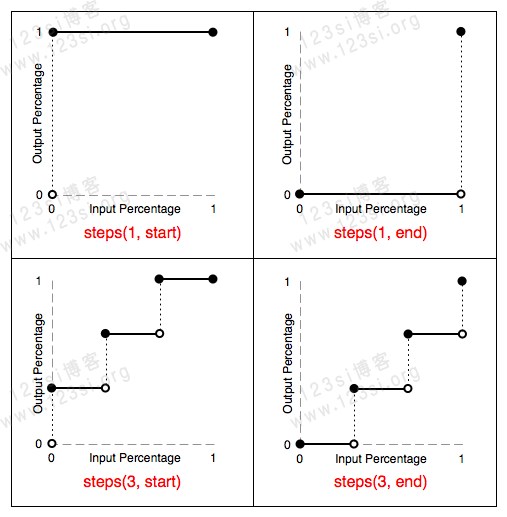
阶跃函数steps指的是@keyframes中各环节之间的时间变换函数,它并不是指整个@keyframes动画阶跃几次,如果需要每个环节到下一个环节只阶跃一次,那么需要设置steps(1, start/end)。
五、完整示例代码
<!DOCTYPE html><html lang="zh-cn"><head><meta charset="UTF-8"><meta name="viewport" content="width=device-width, initial-scale=1.0"><meta http-equiv="X-UA-Compatible" content="ie=edge"><title>CSS3 动画属性 animation-timing-function: steps</title><style type="text/css">@keyframes test-animation {0% {background-color: red;}50% {background-color: yellow;}100% {background-color: green;}}.test {width: 300px;height: 60px;background-color: white;animation-name: test-animation;animation-duration: 1s;animation-timing-function: steps(3, end);}</style></head><body><div class="test"></div></body></html>
关于animation-timing-function: steps(n, start/end)的应用案例,还有另外一篇文章《Twitter 红心点赞 CSS3 动画按钮特效》
六、参考文献
简书 - 何幻 - [CSS] animation-timing-function: steps
animation-timing-function | MDN
The steps() class of timing functions | MDN
(完)